Apps
The built-in catalog mirrors the compose files of mxl-hands-on exercise 4 and exercises 1-3,; the launch dialog turns each entry into a running container with the right mounts, ports and dependencies.
The built-in catalog
All FastAPI apps serve their UI and Swagger (/docs) on container port 9600. The catalog is
catalog/default.json in the repository.
| id | Name | Image | Ports (host -> container) | Category | Domain mount / notes |
|---|---|---|---|---|---|
test-generator |
Test Generator | ghcr.io/cbcrc/test-generator:latest |
9600 -> 9600 | source | /mxl-domain rw |
mxl-info-gui |
MXL Info GUI | ghcr.io/cbcrc/mxl-info-gui:latest |
9699 -> 9600 | monitoring | /mxl-domain ro |
mediamtx |
MediaMTX (WebRTC relay) | bluenviron/mediamtx:latest |
host network (8554, 8889, 8189/udp) | infrastructure | no domain, no UI; auto-launched by the WebRTC apps |
mxl2webrtc |
MXL to WebRTC | ghcr.io/cbcrc/mxl2webrtc:latest |
9601 -> 9600, 8200-8210/udp | output | /mxl-domain ro; requires mediamtx; installs x264 on first start |
file-player |
File Player | ghcr.io/cbcrc/file-player:latest |
9602 -> 9600 | source | /mxl-domain rw; host clips folder -> /home/file ro (required); installs gstreamer1.0-libav on first start |
hls2mxl |
HLS to MXL Gateway | ghcr.io/cbcrc/hls2mxl:latest |
9603 -> 9600 | source | /mxl-domain rw |
input-selector |
Input Selector | ghcr.io/cbcrc/input-selector:latest |
9604 -> 9600 | processing | /mxl-domain rw; param maxInputs (default 3) |
html5-keyer |
HTML5 Keyer | ghcr.io/cbcrc/html5-keyer:latest |
9605 -> 9600 | processing | /mxl-domain rw; shm_size 1 GB; param defaultMode (key / prompt) |
webrtc2mxl |
WebRTC to MXL | ghcr.io/cbcrc/webrtc2mxl:latest |
9606 -> 9600 | source | /mxl-domain rw; requires mediamtx |
mxl-writer |
Test Writer (mxl-gst-testsrc) | ghcr.io/cbcrc/mxl-writer:latest |
- | tools | /domain rw, user 1000:1000; params groupHint, overlayText; fixed flow ids, one instance per domain |
mxl-reader |
Reader / mxl-info shell | ghcr.io/cbcrc/mxl-reader:latest |
- | tools | /domain ro, user 1000:1000; open a terminal and run /app/mxl-info -d /domain -l |
mxl-clip-player |
Clip Player (looping filesrc) | ghcr.io/cbcrc/mxl-clip-player:latest |
- | tools | /domain rw; host clip file -> /app/clip.ts ro (required); runs as root, installs gstreamer1.0-libav on first start |
Details on how each of the CBC/Radio-Canada apps works are in the hands-on gst-apps README. The apps marked "installs ... on first start" fetch a package from the Ubuntu archive when their container starts for the first time, so that container needs network access once.
Note
The ghcr.io/cbcrc/* images are published for linux/amd64. On an arm64 host Docker
needs qemu-user-static / binfmt emulation to run them.
Launching an app
Launch app in the top bar (or Launch app here on a domain) opens the launch dialog.
- Pick an app. Cards are grouped by category and show the image, a badge when the image is not pulled yet (image not loaded for locally loaded images) and the state of an existing container of that app.
- Fill the form.
- Domain - lists the domains under the domain root; + create domain... creates one
inline. Directories without a
domain_def.jsonare listed but cannot be selected until they are fixed under Domains & Flows. - Container name - pre-filled from the catalog; letters, digits,
_,.and-. - Host ports - pre-filled from the catalog. Each port is checked through
/api/ports/checkwhile you type: in use by<container>when another container publishes it, port is already listening on this host when some other process has it bound. Change the port or stop the other process. - Host paths - for apps that mount a host file or folder (File Player's clips folder,
Clip Player's
.tsfile). Required paths must be absolute;/,/etc,/proc,/sys,/dev,/bootand the Docker socket are refused. - Parameters - the app's template values (group hint, overlay text, number of input slots, keyer mode, timezone).
- Also launch required apps - checked by default for apps with dependencies such as
mediamtx. - Advanced - Extra environment (
KEY=VALUElines, merged over the app defaults) and Pull policy (pull only when the image is missing, or always pull before starting). For locally loaded images the pull policy is replaced by an Image select listing the loaded tags.
- Domain - lists the domains under the domain root; + create domain... creates one
inline. Directories without a
- Launch. The dialog follows the job: pull progress per layer, dependency steps, container creation and start. When it is done an Open UI button appears.
Dependencies (requires in the catalog) are resolved first, in the same domain: a running
container of the required app is reused, a stopped one is started, a missing one is launched
with its defaults. That is how MediaMTX comes up automatically for MXL to WebRTC and WebRTC to
MXL.
If a container of the chosen name already exists - typically from the hands-on
docker compose stack - the launch stops with name_conflict and the dialog offers
Start existing (reuse that container as it is) or Remove & relaunch (delete it and
create a fresh one from the catalog entry).
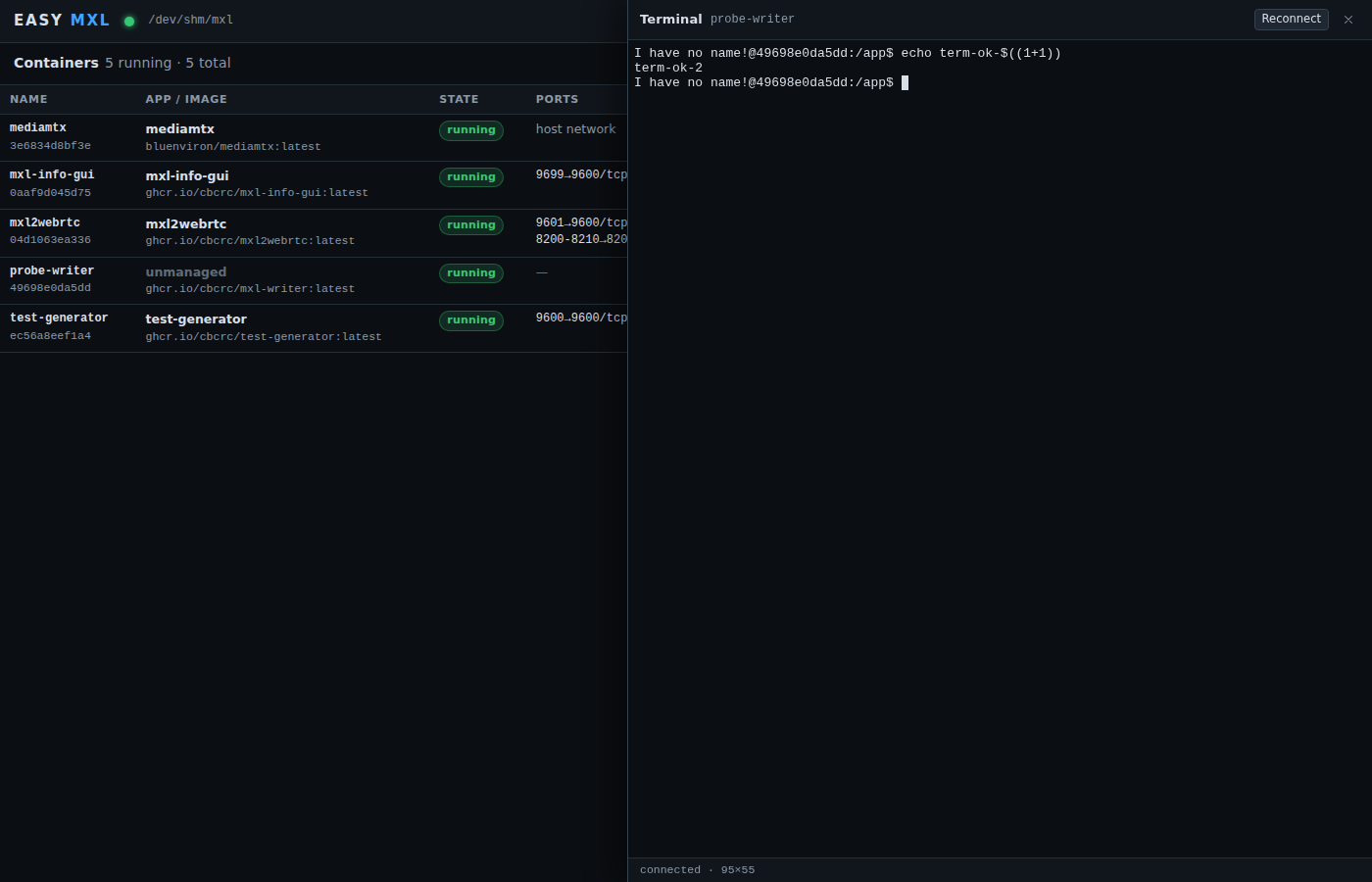
After launch the container appears under Containers with Open UI (opens
http://<the host name you opened EASY MXL on>:<host port><path> in a new tab), API docs
(Swagger), Logs, Terminal, Start / Stop / Restart and Remove. Containers
launched by EASY MXL carry easy-mxl.* labels; containers started any other way are listed
and manageable too, their domain is inferred from mounts under the domain root.
Tip
When EASY MXL itself runs in a container, /api/ports/check probes ports from inside that
container, so the "already listening on this host" hint only reflects the EASY MXL
container. The container-binding check (which app publishes the port) still works.
Adding your own apps
A catalog file is a JSON array of app objects. Extra files are loaded after the built-in one
(--catalog my-apps.json, repeatable, or EASY_MXL_CATALOG=/a.json:/b.json); an entry with an
existing id replaces the built-in entry and "disabled": true hides one. Under systemd put
the path in /etc/default/easy-mxl (EASY_MXL_CATALOG=/etc/easy-mxl/catalog.json) and restart
the service; in the container route bind-mount the file and pass the variable with -e.
Catalog files are validated at start-up; an unreadable file or an invalid entry stops EASY MXL
with a message that names the file and the entry.
Fields (only id, name, image are required):
| Field | Meaning |
|---|---|
id |
^[a-z0-9][a-z0-9-]*$, unique |
name, description, category |
shown in the launch dialog; category is one of source, processing, output, monitoring, infrastructure, tools |
image |
image reference; :latest is assumed when no tag is given |
imagePolicy |
pull (default) or local for images loaded with docker load: never pulled, the launch dialog lists the loaded tags of imageRepository and the chosen one is sent as image |
imageRepository, imageRepositories |
repository (or list of repositories, e.g. one per CPU architecture) whose loaded tags are offered; default: image without tag/digest |
containerName |
default container name (the dialog lets you change it) |
webUI |
{ "containerPort": 9600, "path": "/", "docsPath": "/docs" }; enables Open UI / API docs |
ports[] |
{ "containerPort", "hostPort", "protocol", "rangeEnd"? } with protocol tcp or udp; rangeEnd publishes a range with the same offset |
domainMount |
{ "containerPath": "/mxl-domain", "readOnly": false, "envVar": "MXL_DOMAIN" }; the selected domain is bind-mounted there and, when envVar is set, its container path exported under that name |
env |
{ "KEY": "value" }; values may use {{param}} placeholders and the built-ins {{containerName}}, {{domainName}}, {{domainContainerPath}} |
params[] |
{ "key", "label", "default", "help" } template values, editable in the dialog |
hostPaths[] |
{ "key", "label", "containerPath", "readOnly", "required", "default" } host files or directories to bind-mount (/, /etc, /proc, /sys, /dev, /boot and the Docker socket are refused) |
volumes[] |
{ "name", "containerPath", "readOnly"? } Docker named volumes; name may use placeholders, e.g. "{{containerName}}-state" |
ipcMode |
host, private, shareable, none or container:<name> (Docker --ipc) |
cmd, entrypoint |
arrays, also templated |
user, tty, stdinOpen, init, networkMode, shmSize ("1g"), extraHosts, restartPolicy |
passed through to Docker |
requires[] |
ids of apps that are started (or launched) first, e.g. ["mediamtx"] |
notes, source, disabled |
free text shown in the dialog, link to the origin, hide flag |
Template placeholders work in env, cmd, entrypoint and volumes[].name. Declared
params take precedence over the built-in variables of the same key; an unknown placeholder
is rejected at launch time.
Example: a second test writer with its own group hint, plus hiding an app you do not use:
[
  {
    "id": "mxl-writer-2",
    "name": "Test Writer 2",
    "description": "Second mxl-gst-testsrc instance with its own group hint.",
    "category": "tools",
    "image": "ghcr.io/cbcrc/mxl-writer:latest",
    "containerName": "mxl-writer-2",
    "user": "1000:1000",
    "domainMount": { "containerPath": "/domain", "readOnly": false },
    "cmd": ["/app/mxl-gst-testsrc", "-d", "/domain", "-g", "{{groupHint}}",
            "-v", "/app/v210_flow.json", "-a", "/app/audio_flow.json", "-t", "{{overlayText}}"],
    "params": [
      { "key": "groupHint", "label": "Group hint", "default": "writer-2" },
      { "key": "overlayText", "label": "Overlay text", "default": "Writer 2" }
    ],
    "restartPolicy": "unless-stopped"
  },
  { "id": "hls2mxl", "disabled": true }
]
node dist/bin/easy-mxl.js --catalog ./my-apps.json
An image that does not exist yet on ghcr.io (check the hands-on repository) has to be built
from source and given a new image in a custom catalog. The full schema, including the
locally loaded image fields, is in the design contract.